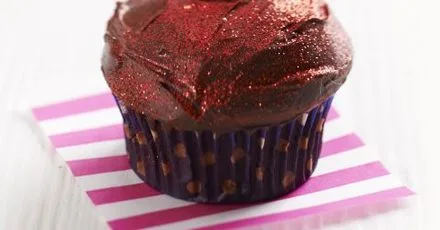
Red velvet choc-cherry cupcakes
Per serving
Very cherry chocolate sponges dotted with fruit and topped with creamy frosting - perfect for a cake sale
Ingredients
12 serv.- butter↗100g g
softened
- golden caster sugar↗140g g
- large eggs↗2
beaten
- plain flour↗225g g
- cocoa powder↗25g g
- bicarbonate of soda↗½ tsp tsp
- buttermilk↗150ml ml
- red food colouring ml
(natural food colouring won't look as bright as an artificial one)
- glacé cherry↗100g g
roughly chopped, plus extra to decorate
- double cream↗150ml ml
- cherry conserve↗140g g
or jam, sieved
- dark chocolate↗100g g
chopped
- red icing↗
or edible red glitter, to decorate (optional)
Step-by-step instructions
- 1
Heat oven to 180C/160C fan/gas 4. Line a 12-hole muffin tin with muffin cases. Beat the butter and sugar in a bowl with an electric whisk until pale and fluffy. Add the eggs a little at a time, whisking until fully incorporated. Sift in the flour, cocoa, bicarb and a pinch of salt. Fold in with a spatula until there are no lumps of flour remaining. Then add the buttermilk, food colouring and cherries, and stir briefly to combine. Divide the mixture between the muffin cases and bake for 20 mins until risen and springy to the touch. Leave to cool slightly, then remove to a wire rack to cool completely.
- 2
Warm the cream and cherry conserve in a small pan, add the chocolate and remove from the heat. Leave for a few mins, then stir until melted and combined. Tip into a bowl and leave to cool completely – the icing will set to a spreadable consistency within about 30 mins. Once cooled and thickened, spread the icing on the cupcakes, decorate with a drizzle of red icing or some red glitter and top with half a glacé cherry. These cakes will keep for a few days in a cake tin.

The Prepka App Is Ready
All your recipes at your fingertips — in the Progressive Web App